Create, write, share your notes — without leaving Pristy
Your internal notes and procedures, directly in your DMS — versioned, shared and searchable.
Espaces
Nouveauté
25.1
26.0
What is it for?
The Pristy Espaces text document editor is a built-in writing tool integrated directly into your DMS — allowing you to create, edit and share notes, procedures or knowledge bases without ever leaving Pristy.
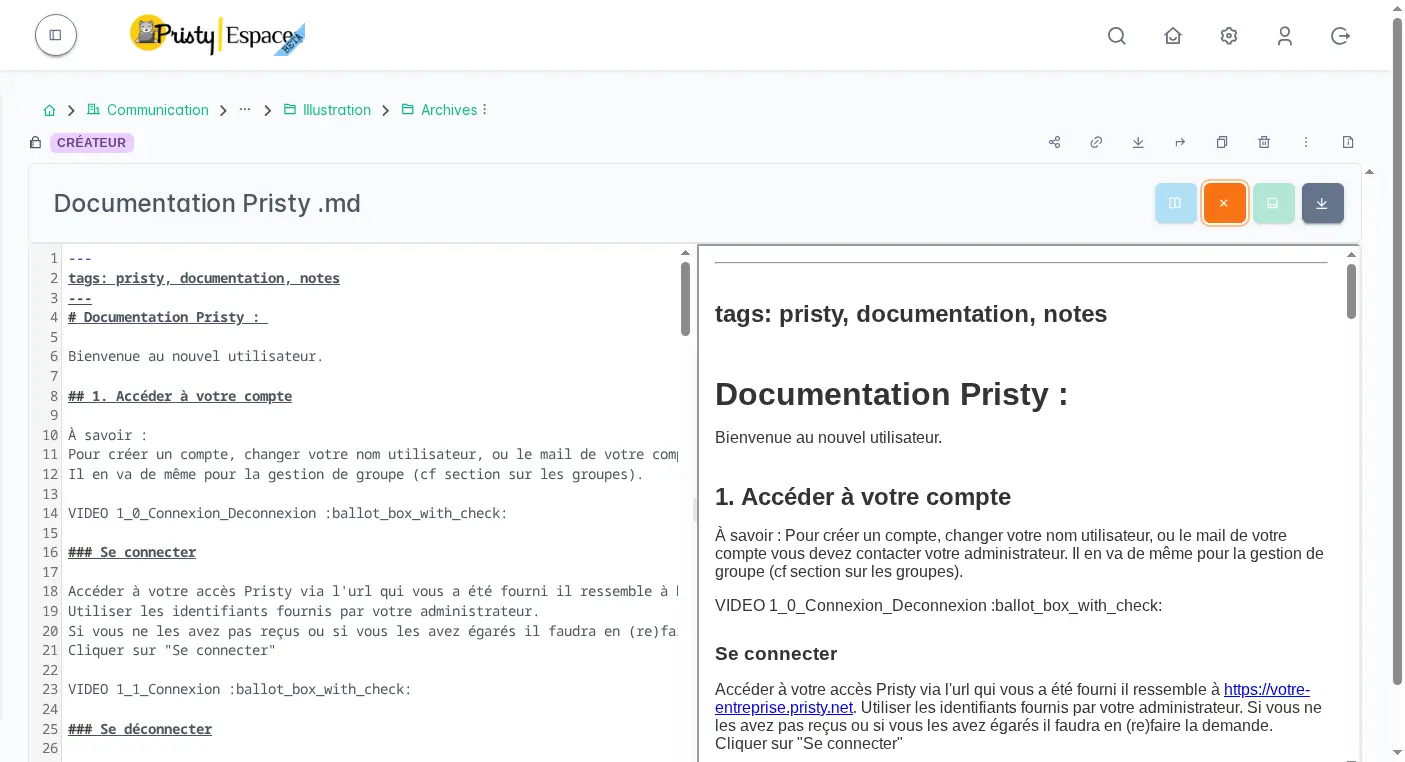
Pristy integrates an editor based on CodeMirror with syntax highlighting. Create notes in Markdown, HTML pages or plain text files — all stored in your space, versioned and shareable like any other document. Technical files (.json, .yml, .xml, .sql…) also open with syntax highlighting.
Files open automatically in the built-in editor when you view them.
Your notes, your procedures, your docs. All in one DMS.
New in version 26.0: Real-time collaboration
Multiple users can now edit the same Markdown file simultaneously in Pristy Espaces. Changes are visible in real time to all participants — no version conflicts, no external tool.
Enabled by administrators via the COLLAB_ENABLED parameter. Available in beta.
How to use it?
From your Pristy space, click New file. Choose the format (Markdown, HTML or text), give your document a name — and you are redirected directly to the built-in editor.
The editor also opens automatically when you view an existing .md, .html, .txt, .json or .yml file. All modifications are versioned automatically: you can at any time view the version history or revert to a previous version.
The document remains in your space with the same access rights as other files — no external tool, no additional configuration.
When should you use it?
Ideal for internal knowledge bases, procedures, lightweight meeting notes or working notes. Everything stays in your DMS, searchable, versioned and shared with the right access rights.
A few concrete examples:
- Project manager — Write the meeting minutes directly in the project space, automatically versioned alongside the relevant files.
- Quality department — Maintain an internal procedures base in Markdown, accessible to the whole team with the same rights as documents.
- Training — Create user guides directly in the dedicated space, no external tool needed, shareable via link.
- IT / IS department — Manage your
.jsonand.ymlconfiguration files directly from Pristy, with automatic versioning.
How does it boost productivity?
No more switching between your word processor and your DMS for simple documents. Your notes and your files are in the same place, in the same tool, with the same access rights and the same search engine.
For teams maintaining an internal knowledge base, this is a concrete gain: procedures are always up to date, versioned, searchable in full text — no export, no copy-paste, no additional dedicated tool.
Frequently asked questions
What file formats are supported?
The editor supports a wide range of formats, all with syntax highlighting:
Documents and content: Markdown (.md), HTML (.html), plain text (.txt), XML (.xml)
Data and configuration: JSON (.json), YAML (.yml, .yaml)
Development languages: Shell (.sh), SQL (.sql), Python (.py), JavaScript (.js), Java (.java), PHP (.php), C/C++ (.c, .cpp), C# (.cs), Ruby (.rb), Kotlin (.kt), Scala (.scala), Groovy (.groovy), Perl (.pl)
All open automatically in the built-in editor when viewed.
Are created files versioned?
Yes. Each modification is versioned automatically, like any Pristy document. You can view the version history and revert to a previous version at any time.
Can the editor be used for complex documents with advanced formatting?
The text document editor is designed for lightweight, structured content (notes, procedures, knowledge bases). For documents with advanced formatting (complex tables, styles, etc.), we recommend Collabora Online integrated with Pristy.
Other recent features
- PDF consultation — Consultez vos pdfs facilement, qu'ils contiennent 2 ou 650 pages.
- Administration tools — Manage Alfresco data models, browse the repository and supervise your platform from Pristy Portail — no server access, no command line.
- Classification plan — Automatically structure your workspaces with the Pristy Espaces classification plan. Define document types and folder hierarchy — Pristy classifies on deposit, without interrupting activity.
- Customisable dashboard — Access what matters most from the moment you log in with the customisable dashboard in Pristy Portail. Profile-based home pages, configurable blocks, personalised by each user.
- PDF editing tools — Edit your PDFs without leaving Pristy — reorder pages, redact, merge, sign. Directly from the viewer, versioned automatically.
Planned developments for this feature
There is always room for improvement! Here is what we have planned for the future of this feature:
- Stabilisation of the real-time collaboration feature
How to get Pristy
Order Pristy today and benefit from modern, intuitive document management
Pristy also includes Pristy Portal application that offers profile and user pages. Pristy Portail is included with the purchase of Pristy Actes and Pristy Espaces (solo or together). Pristy Portail can also be purchased on its own.
Go to our rates page to find out more. Request your quote now and take advantage of our low rates and the chance to give your opinion on future features!